
Still Running a Separate Phone System? Here’s What That’s Actually Costing You
Here’s a scenario that plays out in small businesses every single day.
A team of twelve opens Microsoft Teams first thing in the morning. They’re messaging colleagues, jumping on video calls, sharing files — all inside Teams. Then a client calls. Someone picks up a completely different device, on a completely different system, managed by a completely different vendor.
Two worlds. Two bills. One team stuck in the middle.
If this sounds familiar, you’re not alone. But there’s a good chance your current setup is costing you more than you realize — not just in dollars, but in time, complexity, and missed productivity.
The Dual-System Problem Most SMBs Don’t Know They Have
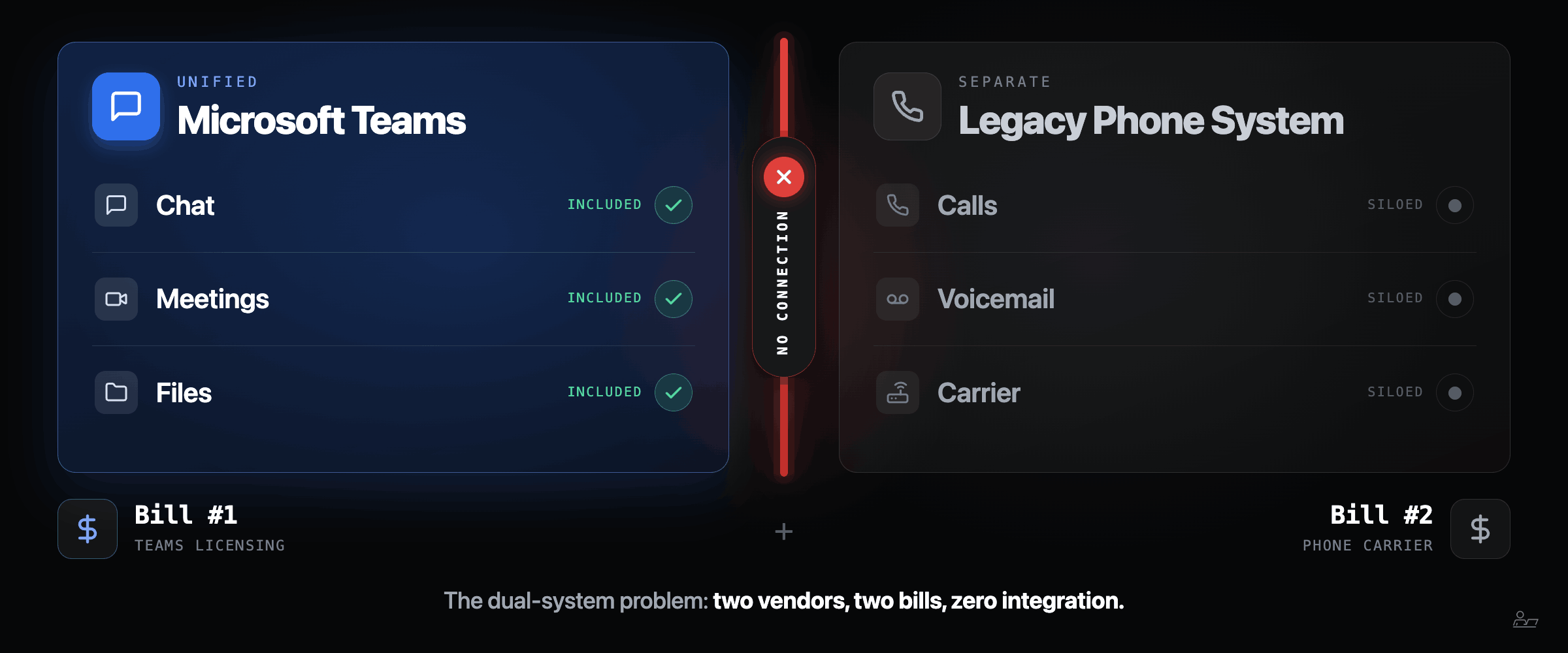
When Microsoft Teams became the go-to collaboration platform for businesses of all sizes, most organizations added it on top of their existing phone infrastructure. They didn’t replace it. That decision made sense at the time. But years later, many businesses are still carrying both systems when they only need one.
The result is what we call the dual-system problem:
Your team uses Teams for meetings, chat, and collaboration
Your legacy VoIP or PBX system handles incoming and outgoing calls
Neither system talks to the other
You’re paying for both, maintaining both, and supporting both
It’s not a technology failure. It’s an integration gap. And it has a cost.
What Microsoft Teams Phone Actually Replaces
Microsoft Teams Phone is not a new app. It’s not something your team has to learn. It’s an extension of the platform they’re already using every day — one that adds full calling capability directly inside Teams.
With Teams Phone enabled through Operator Connect — a Microsoft-certified carrier connection — your business phone numbers route directly into Teams. Your team makes and receives calls from the same interface they use for everything else. No separate desk phone required. No separate app. No context-switching.
What it replaces:
Your legacy VoIP or PBX system
Desk phones for most users
The separate carrier account tied to your old system
The IT overhead required to maintain hardware you no longer need
What it doesn’t replace: the platform your team already knows.
Worth Thinking About
Think about what made Netflix successful. The value wasn’t better picture quality — it was eliminating the trip to the video store, the late fees, and the hassle entirely. Teams Phone does something similar for business communications. It doesn’t just improve your phone system. It eliminates the complexity of running one separate from everything else your team uses every day.
The Real Cost Breakdown
Most businesses look at their phone bill and see one number. What they don’t see are the layers underneath it:
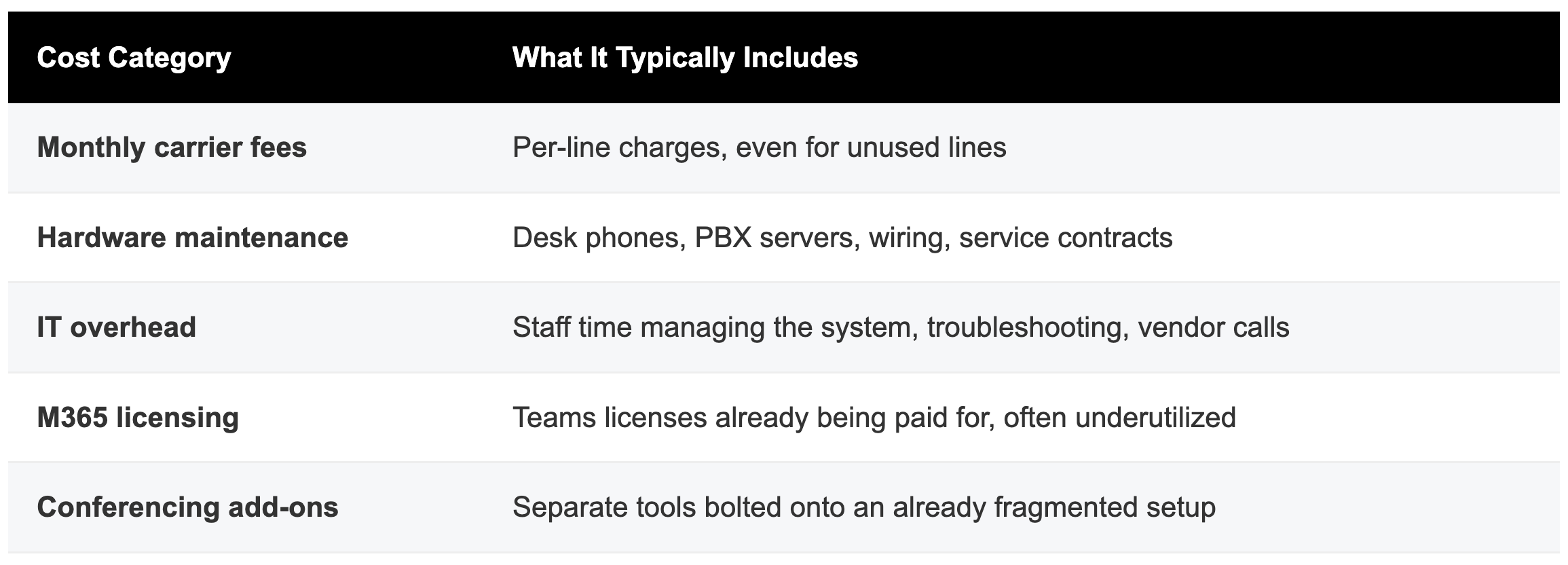
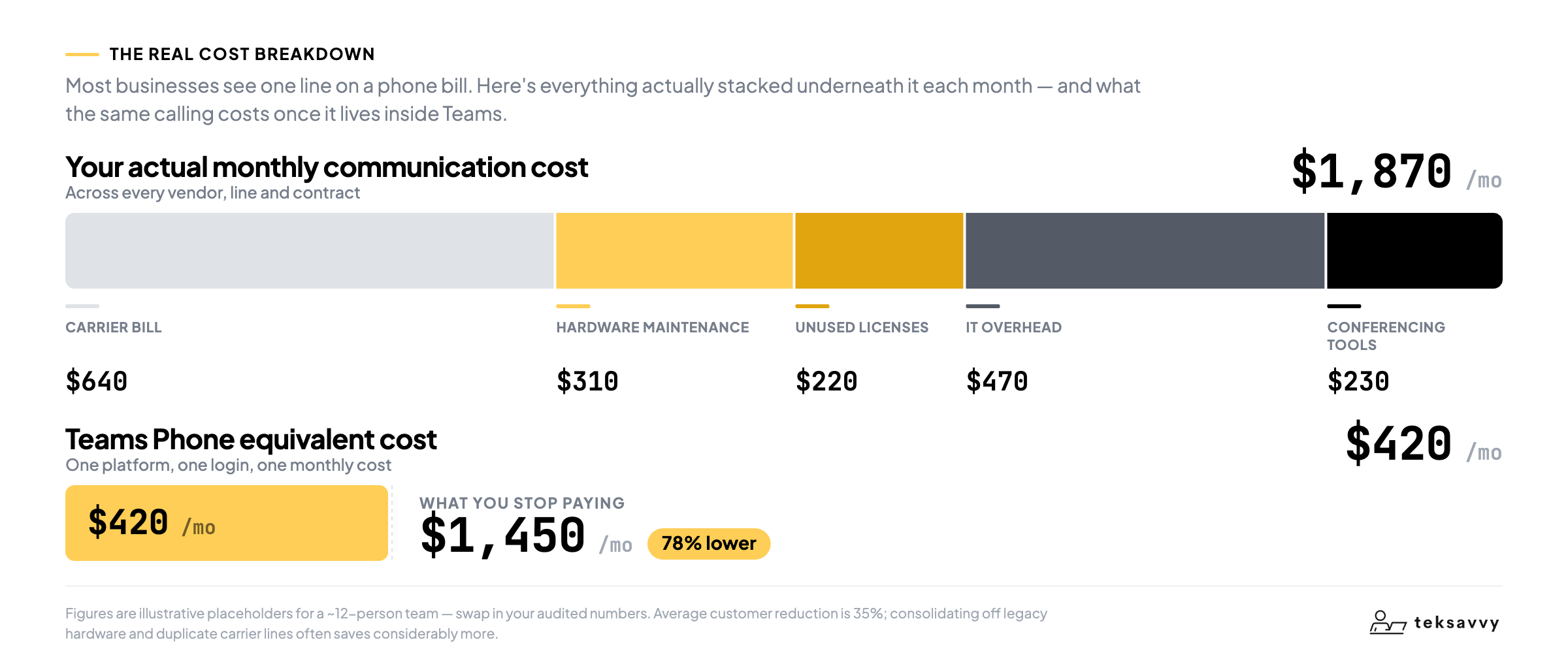
When you add it all up, the true cost of running a legacy system alongside Teams is almost always higher than businesses expect — and most of it disappears when you consolidate onto Teams Phone.
What the One-Platform Outcome Looks Like
Businesses that consolidate onto Teams Phone don’t just save money. They simplify how their entire team communicates.
Calls come in through Teams — on desktop, mobile, or any device with the Teams app
Voicemails, call history, and contacts are all visible in the same interface as chat and meetings
Remote and hybrid employees have full phone functionality from anywhere
IT administration is managed through the Teams admin center, not a separate vendor portal
Adding or removing lines takes minutes, not a call to your carrier
Is Your Business Ready to Make the Switch?
The right time to evaluate is now if:
Your team is already using Microsoft Teams for collaboration
Your current phone contract is approaching renewal
You’re managing a hybrid or remote workforce
Your IT team spends meaningful time on phone system support
You’ve never done a full audit of your communication costs
Ready to stop paying for two phone systems?
At Teksavvy, we specialize in Microsoft Teams telephony for small and mid-sized businesses. We’ll audit your current setup, identify the gaps, and map out a migration plan that fits your timeline and budget.
Book your free 15-minute consultation at teksavvy.co


